
Text-to-Flow Builder
Just describe what you want the bot to do in plain English, and our AI sets up the entire conversation tree for you.
- Powered by advanced LLM models
- Zero learning curve
- Edit manually whenever needed
Other platforms force you into complicated, messy visual flow builders. We use cutting-edge LLM models so you can simply write out your scenario, and we generate the automated flow for you instantly.
Just describe what you want the bot to do in plain English, and our AI sets up the entire conversation tree for you.
Basic includes 5 automation flows, Pro 15 and Scale 25. Extra flows are ₹100 a month each.
Automate the repetitive questions and smoothly hand off complex issues to a human agent without frustrating the user.
WhatsApp automation is a set of rules that send a message when something happens, without anyone in your team pressing send. Something happens (an order is placed, a cart is abandoned, a form is submitted, a customer replies with a keyword), a condition is checked, and a message goes out.
That is the whole idea. The complexity in most automation tools is not in the concept, it is in the interface, which is why Weflux lets you describe the flow in plain English and builds it for you rather than making you assemble it from boxes and arrows.
The useful distinction is between automation that replaces a conversation and automation that starts one. Order updates and OTPs replace a conversation nobody wanted to have. A cart-recovery message starts one you very much want. The second kind needs more care with timing and tone, and it is where the returns are.
Rather than a feature list, here is what these actually look like in practice.
Trigger: cart abandoned event from a supported store integration. Wait: 15 to 60 minutes. Condition: order still not placed. Send: a Marketing template naming the item, with a button back to the cart.
The wait matters more than the copy. Fire it in two minutes and you interrupt someone who is still deciding. Fire it the next day and they have bought elsewhere.
Trigger: COD order placed. Send: a Utility template asking the customer to confirm with a button. Then: tag confirmed orders, and route the silent ones to a human before dispatch.
For Indian D2C this is usually the highest-return flow on the list, because every unconfirmed COD parcel that ships is a return-to-origin cost you pay both ways.
Trigger: a booking exists. Send: a Utility reminder ahead of the slot, with the time and, for virtual bookings, the meeting link. Weflux generates a Google Meet link automatically for virtual appointments and includes it in the reminder.
Trigger: order delivered. Send: a thank-you and care instructions, then after a sensible gap a review request, then a replenishment nudge timed to the product's actual life. Three messages spread over weeks, not three messages on Tuesday.
Trigger: new inbound message from an unknown number. Send: two or three quick-reply questions, tag by the answers, set the lead stage, and assign to the right agent in the shared inbox. The point is not to close the lead, it is to make sure a human opens the right conversation first.
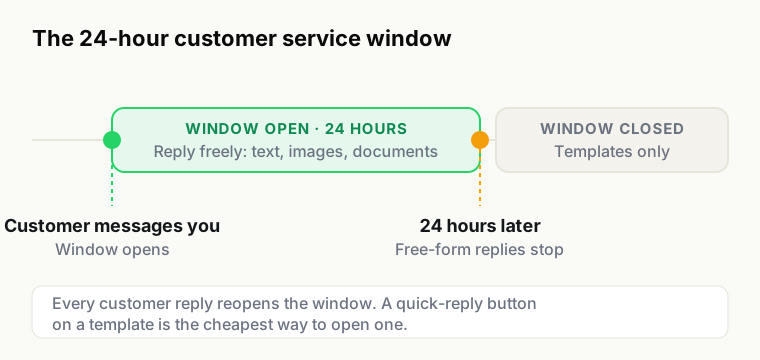
Worth being direct about, because these are platform rules rather than product gaps, and every provider has them.
Connect Google Sheets and supported integrations to your Weflux workspace. See the feature overview for available integrations, or contact us about your requirements.
The words get used interchangeably and it causes real confusion when comparing platforms, so worth separating them.
An automation is proactive. Something happens in your business and a message goes out: an order ships, a cart is abandoned, an appointment is tomorrow. The customer did not ask for it, and outside the 24-hour window it has to be a template.
A chatbot is reactive. A customer messages you and something answers, either with a menu of options or by interpreting what they wrote. It runs inside an open 24-hour window, so it can use ordinary free-form messages.
Most useful setups are both. A broadcast goes out, some people reply, a bot handles the first exchange and qualifies them, and anything it cannot resolve is assigned to a human in the shared inbox with the context already attached. Selling those as separate products is a pricing decision, not a technical one.
The single biggest difference between a flow that earns money and one that generates opt-outs is when it fires, not what it says.
A useful discipline: for every flow, write down what the recipient is doing when it arrives. If the answer is "sleeping" or "at work and irritated", change the timing before you change the copy.
Automation makes it easy to send a great deal without anyone reading it, so pick the measure carefully. Delivery rate tells you almost nothing, since it is near total on a clean list. Read rate is high on WhatsApp for everything, including messages people resent.
The pair that tells the truth is reply rate against opt-out rate. A flow generating replies is starting conversations, which is the point. A flow generating opt-outs is spending your list to make a short-term number look good, and a list is not a renewable resource. Watch both after every change, and be willing to switch a flow off.
For revenue flows such as cart recovery and COD confirmation, attribute properly: compare against a holdout that receives nothing, rather than crediting the automation with every sale that happened to follow it. The uplift is usually real and usually smaller than the raw number suggests.