Send WhatsApp broadcasts to your opted-in contacts, without risking your number.
Weflux runs broadcast campaigns on the official WhatsApp Business Cloud API. Approved templates, real delivery reporting, and none of the ban risk that comes with unofficial bulk tools.
Build, submit and track Meta message templates from the dashboard. Text, images, video, documents and interactive buttons are all supported.
Approval status from Meta, in the dashboard
Free plan: send templates one chat at a time; broadcasts start on Basic
Variables for per-recipient personalisation
Campaign reporting
Every campaign reports what Meta reports back: how many messages were accepted, delivered, read, and how many people replied or opted out.
Delivery and read receipts
Button clicks and replies
Opt-outs tracked per campaign
Official Cloud API
Messages go through Meta's own Cloud API, the same infrastructure Meta operates for every WhatsApp Business Platform provider.
No unofficial automation of the WhatsApp app
Sends paced to your messaging limit
What is a WhatsApp broadcast?
A WhatsApp broadcast is a message sent to many recipients at once, where each person receives it as an individual one-to-one chat rather than a group. Recipients cannot see each other, and replies come back to you privately, into the same thread they would use for any other conversation.
That last part is what separates a broadcast from an email blast. A broadcast is not a one-way announcement. Anyone who receives it can reply, and when they do, a 24-hour window opens in which you can respond with ordinary free-form messages. Most of the commercial value of WhatsApp broadcasting sits in those replies, not in the send itself, which is why a broadcast tool without a decent inbox behind it tends to disappoint.
On the official WhatsApp Business API, a broadcast to people who have not messaged you recently must use a message template approved by Meta in advance. You cannot compose a fresh paragraph and blast it to 5,000 people. This constraint is the whole reason official broadcasting is sustainable: it is also why the numbers sending it do not get banned.
Official WhatsApp Cloud API vs unofficial bulk tools
Many businesses encounter unofficial bulk-sending tools promising unlimited messages from a personal or Business App number for a one-time fee. They work by automating the consumer WhatsApp app, which violates WhatsApp's terms of service. Numbers using them get banned in waves, and a banned number is generally not recoverable.
The honest comparison:
Official WhatsApp Business API
Unofficial bulk tools
Permitted by WhatsApp
Yes
No, violates the terms of service
Risk to your number
Normal policy risk, appealable
Ban in waves, usually permanent
Message content
Pre-approved templates for the first message
Anything, no review
Sending volume
Tiered messaging limit that grows with quality
Advertised as unlimited until the ban
Delivery reporting
Delivered, read and failure states from Meta
Sent from the device, little more
Green tick eligibility
Possible
No
Cost shape
Platform fee plus Meta's per-message charge
One-time or subscription fee
The template requirement is the trade. You give up the ability to send arbitrary text to strangers, and in exchange your number keeps working, your delivery is measurable, and you can apply for verification. Weflux runs entirely on the official Cloud API. We do not offer an unofficial mode, and any provider that offers both is worth asking hard questions about.
How to send a WhatsApp broadcast
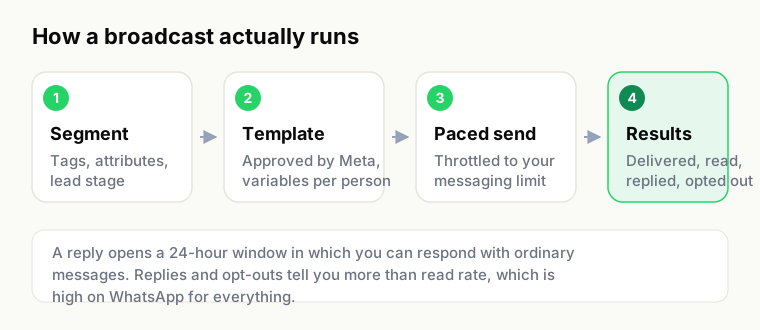
The four stages of a broadcast on the official API.
Once your number is connected, a campaign is five steps.
Connect your WhatsApp Business number. Weflux uses Meta's Embedded Signup, so you authorise through Facebook Business Manager and come back with messaging on the official WhatsApp Business Platform. An existing number on the WhatsApp Business app, or with another provider, can be migrated across.
Create and submit a template. Write the message, mark the variable parts (a name, an order number, a date), pick the right category, and submit it to Meta. Review is usually quick, though it is Meta's queue and not ours, so plan a day rather than a minute for anything time-sensitive.
Choose who receives it. Import contacts by CSV or pull them from an integration, then narrow the list with tags, custom attributes or lead stage. Sending to everyone is almost always the wrong answer.
Fill in the variables and preview. Map each template variable to a contact field. The preview renders exactly what a recipient sees, which is the cheapest possible place to catch a broken merge field.
Send or schedule. Send immediately, or schedule for a sensible local hour. Weflux paces delivery to your account's messaging limit rather than firing everything at once and collecting failures.
Template categories, and which one to use
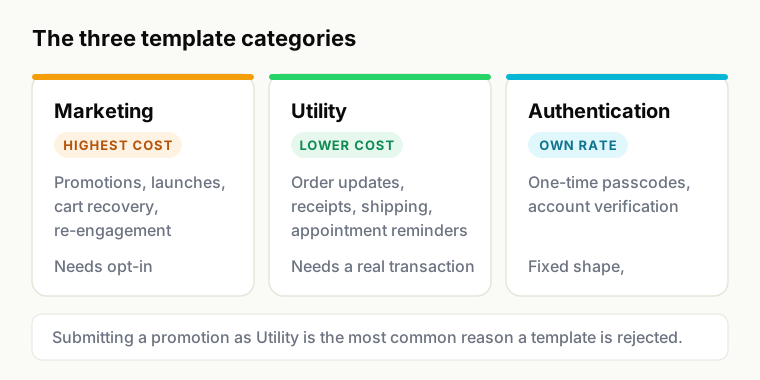
The category decides both what you may say and what Meta charges.
Meta sorts every template into a category, and the category determines both what you are allowed to say and what the message costs. Choosing the wrong one is the most common reason a template is rejected.
Category
Use it for
Examples
Marketing
Anything promotional, or anything whose purpose is to bring someone back
A message about a transaction or request the customer has already made
Order confirmations, shipping updates, payment receipts, appointment reminders
Authentication
One-time passcodes and account verification, nothing else
Login OTP, transaction verification
Marketing is the most expensive category and the most scrutinised. Utility is cheaper, but it only applies where a real transaction exists: dressing a promotion up as an order update gets the template rejected, and repeated attempts affect your account standing. Authentication templates have a fixed shape and cannot carry marketing copy.
Meta sets and periodically revises the per-message rates by category and destination country. Weflux passes those charges through at cost, so the current rate is whatever Meta publishes for India, and every invoice line shows it.
The 24-hour customer service window
When a customer sends you a message, a 24-hour window opens. Inside it you can reply with ordinary free-form messages: text, images, documents, whatever the conversation needs, with no template and no approval. When the window closes, you can only reach that person again with an approved template.
This single rule shapes how good WhatsApp teams work. It is why a shared inbox matters more than it looks like it should, and why response time is a commercial metric rather than a service nicety. A reply that lands nine hours late may still be inside the window. One that lands twenty-six hours late costs you a template message and a great deal of goodwill.
Who gets the broadcast
Weflux stores contacts with tags, custom attributes and a lead stage, and any combination of those can define an audience. In practice the segments that earn their keep are unglamorous: customers who bought in the last ninety days, leads who replied but never converted, people in one city, people who abandoned a cart this week.
Opt-outs are handled for you. When someone asks to stop, they are excluded from future campaigns automatically rather than left for someone to remember. That is both a compliance requirement and a quality-rating protection, since blocks and reports are what push a number's quality rating down.
What you can measure
Every campaign reports accepted, delivered, read, replied and opted-out, sourced from Meta's own delivery webhooks rather than inferred. Failures are itemised with the reason Meta gave, which matters because the common failure modes have different fixes: an invalid number is a data problem, a template pause is a content problem, and hitting your messaging limit is a pacing problem.
Read rates on WhatsApp are genuinely high compared with email, and it is tempting to stop there. Replies and opt-outs are the more useful pair. A campaign with a high read rate and a high opt-out rate is not a success, it is a warning about the next one.
Protecting your number: quality rating and messaging limits
Meta assigns every WhatsApp Business number a quality rating based on how recipients react, principally blocks and reports. It also assigns a messaging limit, the number of unique customers you can start conversations with in a rolling 24 hours. Limits step up as you send consistently to people who want to hear from you, and step down when they do not.
What keeps a number healthy is not clever tooling, it is restraint:
Message people who actually opted in, and be able to show when and how they did
Make the first line say who you are, so nobody has to guess before deciding to block
Send at a sane frequency, and let the segment justify the send rather than the calendar
Honour opt-outs immediately, including the informal ones people type as a reply
Watch the quality rating after every large campaign, not once a quarter
Weflux paces sends to your current limit and surfaces the quality rating in the dashboard, but no platform can protect a number from a bad list. The tool cannot want your customers' consent on your behalf.
What broadcasting costs
Two separate charges. Weflux bills a monthly platform fee by plan, starting at zero. Meta bills per message, by template category and destination. Weflux adds no markup to Meta's charges and shows Meta's rate on every invoice line, which means the number you see is the number Meta charged us.
The practical consequence: as volume grows, the platform fee stops being the interesting number and the Meta charges dominate. That is exactly when a markup would start costing you real money, and exactly why we do not take one. Full detail on the pricing page.
FAQ
Common questions about WhatsApp broadcasts
It depends on your messaging limit, which Meta sets per number. New numbers typically start at 250 unique customers in a rolling 24 hours and step up through 1,000, 10,000 and 100,000 as you send consistently and maintain a good quality rating. Weflux paces campaigns to your current limit rather than exceeding it and collecting failures.
Not for using the official API as intended. Bans in waves are what happens to unofficial tools that automate the WhatsApp app. On the official API the risk is policy-based: message people who did not opt in, and blocks and reports will lower your quality rating and eventually restrict the number. Send to people who asked to hear from you and this is a non-issue.
Yes, for anyone who has not messaged you in the last 24 hours, which is effectively everyone in a broadcast. Templates are approved by Meta before you can send them. Once someone replies, you can respond with free-form messages for 24 hours without a template.
The usual causes are a category mismatch, where promotional content is submitted as Utility, and formatting problems such as variables at the very start or end of the message, unbalanced placeholders, or placeholder text left in the sample values. Rejections are not penalties, you can correct and resubmit, but repeated attempts to push marketing through as Utility do affect account standing.
Yes. A number on the regular WhatsApp Business app, or with another provider, can be migrated to Weflux. Note that once a number is on the API you can no longer use it in the WhatsApp Business app on a phone, because the API becomes the way that number sends and receives.
A monthly Weflux plan fee, which starts at zero, plus Meta's per-message charge for the template category and destination country. Weflux adds no markup to Meta's charges and shows Meta's rate on every invoice line.
No. Each recipient gets an individual one-to-one message and cannot see anyone else on the list. Replies come back to you privately.
Ask clearly, on any channel, and keep a record. A checkout checkbox, a website form, a click-to-WhatsApp ad or an in-store sign-up all work, provided the person understood they would receive WhatsApp messages from your business by name. What does not work is a purchased list, or treating a phone number given for delivery as consent to market.
Yes. Campaigns can be scheduled for a chosen date and time, which is worth doing for anything going to a large list so it lands at a reasonable local hour rather than whenever you happened to press send.
Related
WhatsApp automations for the follow-up sequences that run after a broadcast lands
Shared team inbox for handling the replies inside the 24-hour window
WhatsApp CRM for the tags and lead stages that define a segment
Pricing for plan fees and how Meta's charges are passed through
Connect a number, get a template approved, and send to a segment that asked to hear from you. The free plan lets you send approved templates one chat at a time; broadcasting to a segment starts on Basic, and new workspaces start with a 14-day trial of Scale.