
The control layer between
WhatsApp APIs and your operations.
Weflux gives implementation teams a place to connect business assets, manage approved message templates, send via WhatsApp Cloud API, and prove exactly what happened when a customer asks.
Everything your team needs to run WhatsApp at scale.
Onboard
Embedded Signup, business portfolio selection, WABA mapping, phone-number registration - all tracked in a single handover record.
Govern
Template categories, approval status, quality signals, and internal naming - so teams know what each message is for before it reaches a customer.
Send
Controlled utility and service messaging for opted-in recipients, with full delivery metadata retained for every send.
Sync
View message status, account changes, template events and phone-number updates in your workspace.
Support
Full support trail for delivery questions, failed sends, template changes, and account issues - tied to the right business workspace.
Secure
Minimum-necessary access, role separation, operational logs, token handling, and public deletion procedures for every onboarded business.
Every permission maps to a visible product action.
Weflux requests only what is required to operate WhatsApp Business workflows. No permission is used for advertising, profiling, or any purpose beyond the features described here.
| Product action | Why it exists | Where to see it |
|---|---|---|
| Manage WhatsApp accounts | Fetch and configure client WABA, phone number, templates, and webhook subscription on behalf of the authorized business. | Console demo |
| Send business messages | Send approved template messages and support replies for opted-in customers using the WhatsApp Cloud API. | Messaging desk |
| Authorize business assets | Let a customer securely select and share their business portfolio through Embedded Signup. | Signup flow |
How Weflux uses each WhatsApp permission.
Weflux is a WhatsApp Business Tech Provider. Both permissions below are required to onboard client businesses through Embedded Signup and operate messaging workflows on their behalf.
Send approved template messages to opted-in customers
Weflux uses this permission to send pre-approved WhatsApp message templates to customers on behalf of the authorized business. Messages are only sent to recipients who have provided valid opt-in consent before the first message is initiated. All sends use templates that have already passed Meta's review process.
Data accessed
- Phone number ID (identifies the sending number)
- Recipient phone number (customer-provided opt-in)
- Approved template name and variable parameters
- Message status webhooks: sent, delivered, read, failed
How it is used
- Send order updates and shipping alerts for e-commerce
- Send appointment reminders for healthcare providers
- Deliver transaction alerts for financial services
- Post-support follow-ups after ticket resolution
Manage client WhatsApp Business Accounts as a Tech Provider
Weflux uses this permission to onboard client businesses through Embedded Signup, read their WABA and phone number identifiers, create and manage message templates within their account, and subscribe to webhook events. This is the core permission that enables Weflux to operate as a Tech Provider managing WhatsApp infrastructure for multiple client businesses from a single platform.
Data accessed
- WABA ID and display name (via Embedded Signup)
- Phone number ID and registration status
- Template name, category, status, and body content
- Webhook subscription status and app subscription events
How it is used
- Read client WABA after Embedded Signup authorization
- Create and submit templates for Meta approval on client's behalf
- Subscribe to webhooks for message status and account changes
- Fetch template approval status to inform operations team
Industries already running this workflow.
Weflux handles transactional messaging for teams that need to send high-trust messages to opted-in customers under real compliance requirements.
E-commerce & retail
Order confirmations, shipping updates, delivery alerts, and return notifications sent through approved utility templates to customers who opted in at checkout.
Healthcare & wellness
Appointment reminders, prescription pickup alerts, lab result notifications, and post-care follow-ups to patients who have opted in to receive updates.
Financial services
Transaction alerts, payment confirmations, account status updates, and security notifications through compliant, pre-approved messaging flows.
Ready to connect your business?
Start with our 14-day free trial of Scale. Set up in 10 minutes.
What is the WhatsApp Business API?
The WhatsApp Business API, officially the WhatsApp Business Platform, is Meta's programmatic interface for sending and receiving WhatsApp messages at scale. It has no chat interface of its own. It connects to software, which is where the interface lives, and it is built for volume, multiple agents and automation in a way the consumer apps are not.
It exists because WhatsApp's other products do not scale. The consumer app is one person, one phone. The WhatsApp Business app adds a catalogue and quick replies but is still tied to a single device. The API separates the phone number from the device entirely, which is what makes a shared inbox, a broadcast to 20,000 people, and an automated order update possible at all.
API, Business App or consumer app: which do you need?
| WhatsApp (consumer) | WhatsApp Business app | WhatsApp Business API | |
|---|---|---|---|
| Cost | Free | Free | Platform fee plus Meta's per-message charge |
| Users per number | 1 device | 1 device, limited linked devices | Unlimited, through software |
| Campaign broadcasts | No | Broadcast lists, capped, contact-saved only | Yes, on approved templates |
| Automation | No | Away messages and greetings only | Full, event-driven |
| Green tick eligible | No | No | Yes, subject to Meta's review |
| Chat interface | The app | The app | None; your provider supplies it |
| Best for | Personal use | A one-person business | A team, or any real volume |
The practical test: if more than one person needs to answer the number, or you need to message more than a handful of people who have not saved your contact, you need the API. Below that, the Business app is genuinely fine and free.
What a Meta Tech Provider does, and why you need one
Meta does not sell the WhatsApp Business Platform to businesses directly in any meaningful retail sense. You reach it through a Meta partner such as a Tech Provider: a company Meta has approved to connect businesses through Embedded Signup, run the API infrastructure, and give you software to actually use it. Weflux is a Meta Tech Provider.
What a provider like Weflux does for you: onboards your number through Meta, submits and tracks your message templates, provides the inbox, campaign tools, automation and CRM, processes Meta's delivery and read events, and bills you.
Where providers differ is almost entirely commercial, not technical. Everyone is on the same Cloud API. The differences that matter are what they charge on top of Meta's per-message rate, whether the platform fee is per seat or per workspace, how fast onboarding actually is, and whether they will help with Business Manager verification and the green tick.
The markup question is the one to ask first. Meta publishes its conversation rates. Many providers add a per-message margin on top, which is invisible on a monthly bill and becomes the dominant cost as volume grows. Weflux passes Meta's charges through at cost and shows Meta's rate on each invoice line, which is the whole reason the company positions the way it does.
How to get WhatsApp Business API access in India
- Have a Facebook Business Manager. Free to create. This is where your WhatsApp Business Account lives, and it should be under your own company, not your provider's.
- Pick a phone number. It must be able to receive an SMS or call for verification, and it must not currently be active on the WhatsApp consumer or Business app. A number already on the Business app can be migrated, but it leaves the app when it does.
- Connect through Embedded Signup. With Weflux this is a Facebook authorisation flow that takes minutes rather than a support ticket that takes days. You stay the owner of the assets throughout.
- Complete Business Verification. Meta verifies your business exists using registration documents and a matching public presence. This gates your messaging limits, so do it early rather than when you hit the cap.
- Get templates approved. Submit the messages you intend to send. Review is usually quick but it is Meta's queue, so plan a day for anything time-sensitive.
- Send, and let the limits rise. New numbers typically start at 250 unique customers per rolling 24 hours and step up through 1,000, 10,000 and 100,000 as you send consistently with a good quality rating.
What it costs
Two charges, and conflating them is the most common source of confusion.
Meta charges per message, by template category and destination country. Marketing is the most expensive, Utility is cheaper, Authentication is its own category, and service replies inside the 24-hour window are treated differently again. Meta publishes and periodically revises these rates.
Your provider charges a platform fee for the software. On Weflux that starts free and runs to ₹4,999 a month, and it is separate from Meta's charges, which we pass through at cost.
The arithmetic worth doing before you choose anyone: take your expected monthly message volume, apply Meta's published rate for the category you will actually send, then add any per-message markup the provider takes. At low volume the platform fee dominates. Past a few thousand messages a month the markup does, and it does not stop growing. Full detail on the pricing page.
Message templates, and the 24-hour window
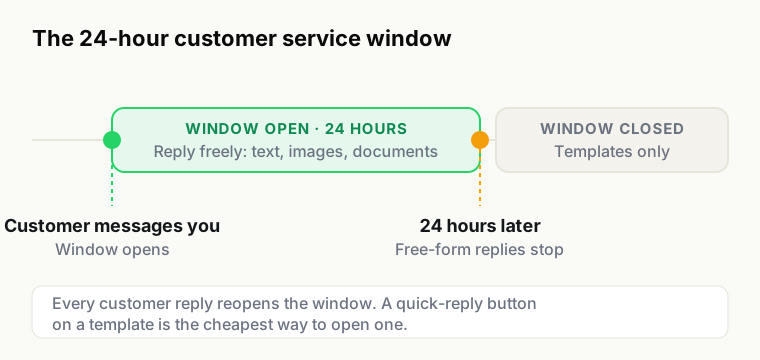
Two rules explain most of how the platform behaves.
You cannot message someone first with free-form text. Any message to a person who has not written to you in the last 24 hours must use a template that Meta approved in advance. Templates come in three categories: Marketing for anything promotional, Utility for messages about a transaction the customer already made, and Authentication for one-time passcodes.
A customer message opens a 24-hour window. Inside it you can reply with ordinary text, images or documents, with no template and no approval. When it closes, you are back to templates. This is why response time on WhatsApp is a commercial number and not just a service metric: a late reply converts a free conversation into a paid one.
Quality rating, messaging limits and the green tick
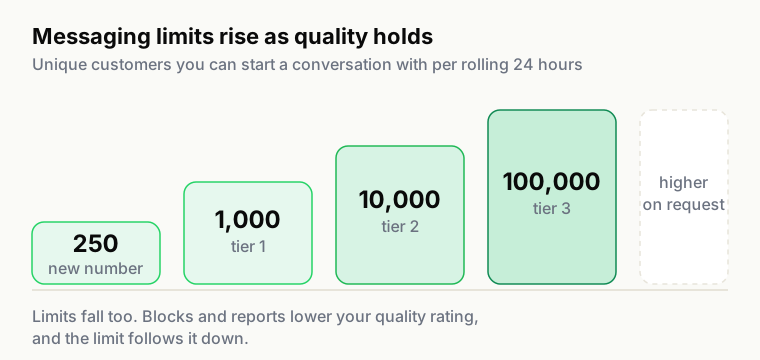
Meta assigns every number a quality rating driven by how recipients react, principally blocks and reports, and a messaging limit for how many unique customers you can start conversations with per rolling 24 hours. Send to people who want to hear from you and the limit rises. Do not, and it falls, usually during the campaign where you needed it most.
The green tick, formally the Official Business Account badge, is separate from Business Verification and is not something any provider can promise. Meta grants it based on your brand's public notability: press coverage and third-party mentions, not your ad spend or your provider. We will help you prepare and submit the application, and anyone guaranteeing the outcome is selling you something they do not control.
Building on it directly
Connect Google Sheets and supported integrations to your Weflux workspace. See the feature overview for available integrations, or contact us about your requirements.
Manage customer conversations together in a shared team inbox.
WhatsApp Business API questions
Related
- Broadcasts for campaign messaging on the official API
- Automations for event-driven messaging
- Shared inbox for multiple agents on one number
- Embedded Signup for how onboarding actually works
- Pricing and the pass-through billing model
- Product documentation
Connect a number and see it work.
Embedded Signup takes minutes, the free plan sends real template messages, and Meta's charges are passed through at cost.