
Flexible Team Seating
Don't get penalized for growing your team. Our plans scale with your organization cleanly and affordably.
- 3 members on Basic, 5 on Pro, 10 on Scale
- Multi-device login for everyone
Assign chats, leave internal notes and work one queue together. Seats are included in every plan: 3 members on Basic, 5 on Pro and 10 on Scale.
Don't get penalized for growing your team. Our plans scale with your organization cleanly and affordably.
Automatically route incoming customer messages to the right agent or department based on skill, language, or round-robin.
Discuss issues with your teammates directly inside the customer conversation without the customer ever knowing.
A shared WhatsApp inbox is one WhatsApp Business number that several people answer from, with each conversation assignable to a specific person so nobody is answered twice and nobody is missed. Everyone sees the same threads, the same history and the same customer context, from their own login.
This is not possible on the regular WhatsApp Business app. That app ties a number to a device, and the linked-device feature is built for one person across their own phone and laptop, not for a team. Teams that try it end up with agents logging each other out, no record of who said what, and a conversation history that lives on somebody's phone. The shared inbox exists because the WhatsApp Business API separates the number from the device.
On the official API, as many as your platform allows. There is no WhatsApp-imposed limit on how many people can answer one number. The limit is commercial, set by whichever provider you use.
Weflux includes team seats in the plan rather than charging per agent, up to ten members on the Scale plan. This matters more than it sounds: per-seat pricing quietly discourages you from giving access to the people who occasionally need it, and those are exactly the people whose absence turns a two-minute answer into a two-day one.
The core job of a shared inbox is answering "who is waiting on me" before anything else. Weflux handles that with:
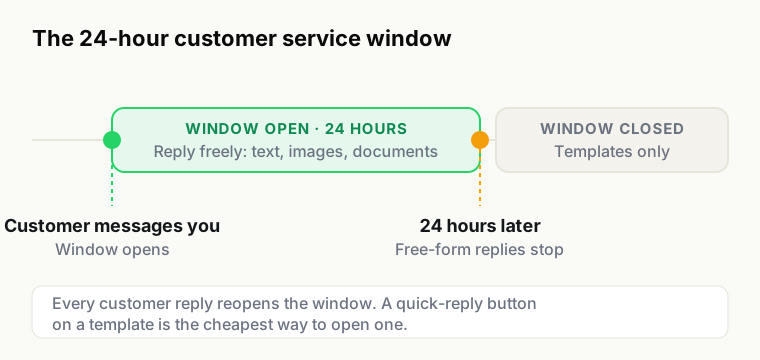
On WhatsApp, when a customer messages you, a 24-hour window opens in which you can reply freely. After it closes, you can only reach them with an approved template, which costs money and reads like marketing rather than an answer.
So a slow reply on WhatsApp is not merely poor service, it converts a free conversation into a paid one, and it converts a warm lead into someone who has already been served by a competitor. Weflux tracks response times per agent and per conversation so the window is something you manage rather than something you discover.
Facebook Messenger and Instagram DM conversations land in the same inbox, with the same assignment and notes. They behave differently from WhatsApp and the interface says so rather than pretending otherwise: neither channel lets a business message someone first, and neither has message templates. You will not find a greyed-out button that could never have worked.
A good part of a support shift does not happen at a desk. The inbox is built to be worked from a phone on a mediocre connection: readable touch targets, a conversation list that loads before the whole workspace does, and counts that are true across the workspace rather than true of the page that happened to load.
Adding people is an invitation by email, and they land in the same inbox with their own login. Where teams usually get this wrong is structure, not setup.
The pattern that works: keep one shared queue rather than a queue per person, assign from it rather than distributing in advance, and let anyone see anything. Pre-assigning conversations by rota feels organised and quietly guarantees that a customer waits for someone who is on leave.
Assign conversations to teammates so each customer has a clear point of contact.
The same inbox serves both, but the working pattern differs and it is worth deciding which one you are optimising.
Support is queue-shaped. Success is the oldest unanswered conversation being young. What helps: fast assignment, quick replies for the top recurring questions, and internal notes so a handover does not make the customer repeat themselves.
Sales is pipeline-shaped. Success is nobody warm going cold. What helps: lead stages on the contact, ownership that persists across conversations so a customer keeps the same person, and knowing when a 24-hour window is about to close on someone who was interested yesterday.
Trying to run both with one set of habits is why teams feel the inbox is fighting them. Tag the conversation for what it is, and let routing send it to people who work that way.
Most conversations that matter start automated and end human. The handover is where the experience is won or lost.
Two rules make it work. First, the customer should never have to repeat what they already told the bot, which means the transcript and any collected fields arrive attached to the conversation. Second, the handover should be explicit: the customer is told a person is joining, and the conversation is assigned to someone who is actually available rather than dropped into a queue at 9pm.
A handover that silently changes who is typing, with no acknowledgement and no context, is worse than having no automation at all.
Weflux reports response time per conversation and per agent. Two cautions on using it.
First measure first response separately from resolution. They are different problems with different fixes, and averaging them hides both. Second, remember the 24-hour window is the real deadline: an average of four hours looks respectable and can still contain the conversations that quietly aged out overnight and now need a paid template. Look at the tail, not the mean.
Most teams arrive here after outgrowing the WhatsApp Business app, usually at the point where a second person needs to answer. The move is straightforward but there are consequences worth knowing before you start rather than after.
What you gain: several people on one number with their own logins, assignment so work is not duplicated, internal notes, a history that survives someone leaving, templates and broadcasts at scale, and automation.
What changes: the number leaves the phone app. Once it is on the API, the API is how it sends and receives, and you work it through the web inbox on desktop or mobile browser. There is no going back and forth day to day.
What does not carry over: your existing chat history on the app does not migrate, because it lives on the device. Plan for a clean start on history, and export anything you genuinely need first. Contacts you can export and import; conversations you cannot.
The practical approach: migrate the number, keep a separate personal number on the app if individuals still want one, and give the team a week where both the old process and the new inbox run before you rely on it entirely. Migration itself is usually quick once Meta clears the request, but the working-habit change is the part that takes time.
Two honest limits. This is a WhatsApp-first inbox, so if most of your volume is email with WhatsApp as a side channel, a general helpdesk with a WhatsApp connector will probably suit you better. And it is a shared inbox rather than a full ticketing system: there are conversations, assignment, notes and stages, not SLAs, escalation matrices and CSAT surveys. For a lot of teams that is the point, but it is worth knowing which you are buying.