
WhatsApp message templates, explained properly.
Every WhatsApp broadcast starts with an approved template. Here is how the three categories work, what gets a template rejected, and how to write ones that pass first time.
What a WhatsApp message template is
A WhatsApp message template is a message you register with Meta in advance and get approved before you can send it. Once approved, you can send it to anyone who has opted in, filling in the variable parts per recipient.
Templates exist because of one rule: on the WhatsApp Business API you cannot send free-form text to someone who has not messaged you in the last 24 hours. Any first contact, any broadcast, any reminder to a quiet customer, has to be a template. Inside an open 24-hour window you can write whatever the conversation needs, with no template at all.
The three categories
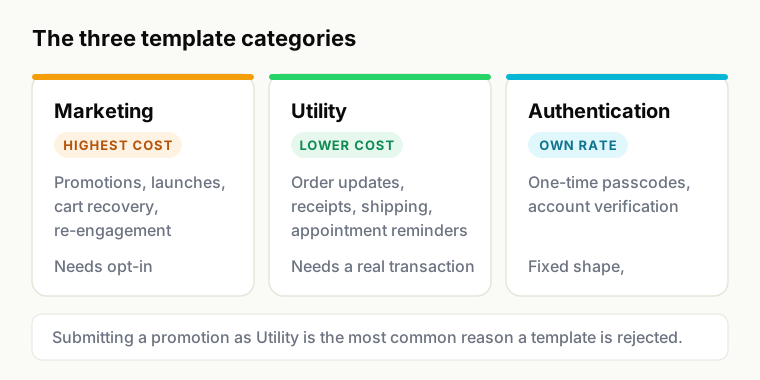
Meta sorts every template into a category. The category decides both what you are allowed to say and what Meta charges you, and choosing the wrong one is the single most common reason a template is rejected.
| Category | What it is for | Typical examples | Relative cost |
|---|---|---|---|
| Marketing | Anything promotional, or whose purpose is to bring someone back | Offers, launches, cart recovery, re-engagement, newsletters | Highest |
| Utility | A message about a transaction or request the customer already made | Order confirmations, shipping updates, receipts, appointment reminders | Lower |
| Authentication | One-time passcodes and account verification only | Login OTP, transaction verification | Its own rate |
The tempting move is to submit promotional content as Utility because it is cheaper. It does not work: reviewers check whether a real transaction exists, the template gets rejected, and repeated attempts affect your account standing. Meta publishes and periodically revises the actual rates by category and country.
Why templates get rejected
Rejections are not penalties. You correct and resubmit. But the same handful of causes account for most of them.
- Category mismatch. Promotional content submitted as Utility. By far the most common.
- Variables at the very start or end. A template that begins or ends with
{{1}}is rejected, because Meta cannot tell what the message will actually look like. - Two variables side by side.
{{1}} {{2}}with nothing between them reads as a blank to a reviewer. - Placeholder sample values. Submitting samples like "xxxx" or "test" gives the reviewer nothing to judge. Use realistic values.
- Unclear purpose. A message a reviewer cannot map to a real business action, or that reads like it was written for a different channel.
- Prohibited content. Categories WhatsApp does not permit at all, including alcohol, tobacco, weapons, adult content, gambling in most jurisdictions, and unapproved medical claims.
- Formatting abuse. Excessive capitals, repeated punctuation, or emoji standing in for words.
Formatting rules that matter
- Variables are numbered
{{1}},{{2}}and so on, in order, with no gaps. Provide a realistic sample for each. - Header is optional and can be text or media: image, video or document. Media headers carry well for order confirmations and launches.
- Body is the message. Keep it short enough to read on a phone without expanding.
- Footer is optional, small, and cannot contain variables. A good place for an opt-out line.
- Buttons come in two kinds: quick replies, which send a response back into the conversation, and call-to-action buttons, which open a URL or dial a number. Buttons materially improve response rates, and a quick reply is the cheapest way to open a 24-hour window.
- Languages are per-template. The same template registered in Hindi and English is two approvals, selected per contact.
Template patterns that pass
Order confirmation (Utility)
Hi {{1}}, your order {{2}} is confirmed. We will let you know as soon as it ships. Total: {{3}}. Buttons: Track order, Contact us. Passes because a real transaction exists, the variables are surrounded by text, and the purpose is unambiguous.
Cash-on-delivery confirmation (Utility)
Hi {{1}}, please confirm your COD order {{2}} for {{3}} so we can dispatch it today. Buttons: Confirm order, Cancel. The quick replies do the work here; they open a window and give you a machine-readable answer.
Appointment reminder (Utility)
Hi {{1}}, this is a reminder for your appointment on {{2}} at {{3}}. Buttons: Confirm, Reschedule. Keep the procedure or department out of it: the patient knows what they booked, and the message sits on a device that may be shared.
Abandoned cart (Marketing)
Hi {{1}}, you left {{2}} in your cart. It is still available if you would like to complete your order. Button: Complete order. Marketing category, correctly declared. Trying to pass this as Utility is the classic rejection.
Back in stock (Marketing)
Hi {{1}}, {{2}} is back in stock. You asked us to let you know. Button: Shop now. The second sentence matters: it reminds the recipient they opted in, which lowers the block rate.
Writing templates that people do not block
Approval is the low bar. Not being blocked is the one that protects your number.
- Say who you are in the first line. Nobody should have to guess before deciding whether to report you.
- Make the first sentence the point. The notification preview is what most people actually read.
- One purpose per template. A message doing three jobs gets ignored for all three.
- Give an exit. A footer opt-out line costs you a few recipients and protects your quality rating, which is worth far more.
- Write for the person, not the category. Utility templates that read like marketing get reported even when they were approved.
Managing templates in Weflux
Build, submit and track templates from the dashboard, with Meta's approval status shown as it returns. Variables map to contact attributes so a broadcast fills them per recipient, and the preview renders exactly what the recipient will see, which is the cheapest place to catch a broken merge field. See broadcasts for how templates are used in a campaign.
Template questions
Related
- Broadcasts for sending templates at scale
- Automations for triggering them from events
- WhatsApp Business API guide for how the platform works
- More template examples
Get your first template approved.
Build and submit from the dashboard, and watch Meta's status come back. The free plan includes three templates, sent one chat at a time.